Keyboards & Pianos
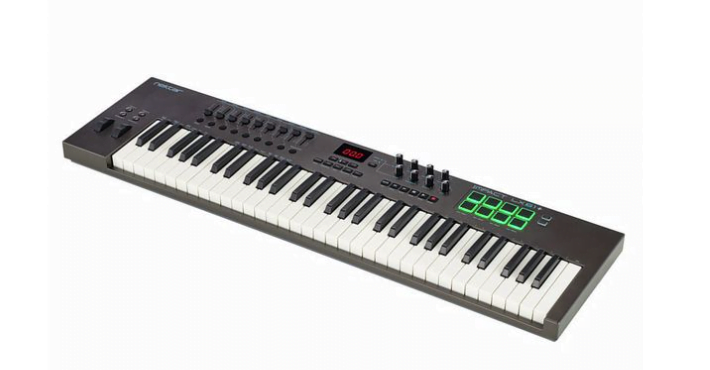
Nektar Impact LX61 Keyboard Controller
KES 52,500
Only 1 left — order soon
1
or contact us directly
✅ Secure M-Pesa checkout
💬 WhatsApp order support
🎸 Genuine products, not knock-offs
🚚 Nairobi delivery, countrywide shipping
Shipping & returns policy →
Description
Nektar Impact LX61 Keyboard Controller The Impact LX49+ and LX61+ USB MIDI controller keyboards are jam-packed with intelligent and expressive performance control not even available on many premium products. Ever wanted a MIDI controller that hooks up automatically to your DAW? Impact LX49+ and LX61+ do exactly that. Nektar DAW Integration custom designed for Bitwig, Cubase, Cakewalk, Digital Performer, FL Studio, GarageBand, Logic Pro, Nuendo, Reaper, Reason and Studio One takes Impact LX+ way beyond functionality normally offered by a USB MIDI controller keyboard. With Impact LX+ the hard work is done, so you can focus on your creativity. IMPACT LX+ MIDI CONTROLLER KEYBOARD The 49 or 61 note velocity sensitive keyboard is a synth action with a medium tension. With 4 velocity curves gradually increasing in dynamics there is a choice for any playing style. If you don’t need velocity, 3 fixed velocity levels cater for a consistent output. Octave and transpose buttons as well as pitch bend and modulation wheels are within reach, so you can quickly shift the keyboard up or down an octave or semitone or apply additional articulation with the wheels. OCTAVE & TRANSPOSE BUTTONS There is more to the 4 Octave & Transpose buttons than meets the eye. 4 functions are selectable on the fly so you can make important changes at any time, even while you play. A key combination makes assignment quick and easy. Choices include sending out MIDI Program Messages, change the Global MIDI Channel or select any of Impact LX+’s 5 user presets with either the Octave or Transpose buttons. CONTROL CENTER Nine 30mm faders, 9 MIDI buttons and 8 encoders are at the center of the Impact LX49+ and LX61+ control panel. Each control is fully MIDI programmable to send any MIDI CC message for use with hardware or software MIDI products. Used with Nektar DAW integration, the controls take on a life of their own, providing flexible pre-mapped DAW control giving you the best of both worlds. All MIDI controller settings can be stored in any of the 5 Impact LX+ presets for recall at any time. And if you switch Null on, any parameter values are stored when you change presets so you avoid parameter jumping. PADS For groove and beat creation, Impact LX’+s 8 velocity sensitive pads make life easy. Calibrated to trigger at a light touch, finger drumming is suddenly well within reach with a nice and even velocity response. Each pad can be assigned any MIDI note number or MIDI cc message for use as MIDI trigger or toggle buttons. But the best part is the “Pad Learn“ feature, which allows you to just select a pad, play the note or drum sound you want on the keyboard and assignment is done. No complex menus for a task that’s essential to getting the most out of your pads. Assignments are stored over power cycling so you don’t lose your settings when you switch your system off for the night. In addition, 4 pad map locations can store your settings for future recall. The 4 color LED illumination not only looks good but also indicate which pad map is currently loaded and can even tell you which type of MIDI message each pad sends. With Nektar DAW Integration, the pads are automatically mapped in for example Reason and Bitwig.. The two Clips and Scenes buttons are used in Bitwig to trigger…., Clips and Scenes. In Reason, a clever control of Reason’s location points create a similar experience with scenes triggering of any Reason song. NEKTAR DAW INTEGRATION Impact LX49+ and LX61+ software DAW integration sets it apart from other MIDI controllers. We write our own DAW integration and therefore are able to optimize interaction with your DAW and ensure supports for most of the popular DAWs. A common workflow gives access to many of the functions you are most likely to need when recording and performing with your Impact LX+. The best part is that it’s all done for you: Simply complete the installation process and start making music! Impact LX+ DAW integration currently supports Bitwig, Cakewalk, Cubase, Digital Performer, FL Studio, Garageband, Logic, Nuendo, Reaper, Reason and Studio One. Buttons and controls are labeled so you don’t have to remember how they are assigned. That’s why Impact LX+ is a breeze to use but with enough extra features under the hood to challenge even the most experienced power user. TRANSPORT & NAVIGATION Six dedicated transport buttons are always within reach and mapped to control Cycle, Rewind, Forward, Stop, Play and Record. Press Shift to get access to alternate functions such as Goto L, Set L, Set R, Undo, Click and Mode. Dedicated Track up/down and Patch up/down buttons are located below the display. MIXER CONTROL Press mixer and the first 8 Impact LX+ faders are assigned to control 8 channels of your DAWs mixer. An alternate Bank up/down function moves control assignments to the next or previous group of 8 channels. Importantly, the selected track so the 9th fader is assigned to the currently selected channel so you always know wh